Core RX 9070 XT Aorus Elite - gpu hotspot @ 90c

moderatelycool

New member

I recently purchased and fitted "Alphacool Core RX 9070 XT Aorus Elite with Backplate" to my "Gigabyte Radeon RX 9070 XT GAMING OC"

Under gpu load (gaming and furmark) I get great GPU temperatures, but really bad GPU Hot Spot temps.

For instance when I start furmark, the GPU temp stays low, then slowly climbs, as the water in the loop warms. But the hotspot temp immediately leaps to 80c, then slowly climbs.

Right now (running furmark for 10 mins):
GPU 42.6c
GPU hotspot: 89.3c

When following the install instructions for the block I did notice that the block did not contact all the board components that the OEM air block did.

This feels wrong instinctively. It doesn't appear to be causing any actual problems right now (the card isn't throttling as far as I can tell), but its currently winter so the ambient is low. I can imagine this being a problem in summer.
 

Eddy

Iceman
Staff member
Hi,

It is completely normal that certain components covered by the air cooler are not covered by a water block. Air coolers are large and heavy, and due to their height they create lateral forces. That’s why they use a much larger contact surface. This often includes components like the coils (chokes), which don’t actually require active cooling but are among the tallest parts on the PCB. There’s no need to worry about that – this is normal design behavior.

Hotspot temperatures on AMD cards are generally significantly higher than the average GPU temperature. Since the 7000 series, this has been a common characteristic of AMD GPUs. However, a temperature delta of 46°C is slightly on the higher side. Typically, the difference should be around 35–40°C. That said, this can also depend quite heavily on the individual GPU quality.

You can try loosening all screws slightly, then tighten the four screws around the GPU first, either clockwise or counterclockwise. After that, tighten the remaining screws. In some cases, tightening in a circular pattern (clockwise or counterclockwise) works better than the usual cross pattern.
 

r0b0yt0

New member
I recently purchased and fitted "Alphacool Core RX 9070 XT Aorus Elite with Backplate" to my "Gigabyte Radeon RX 9070 XT GAMING OC"

Under gpu load (gaming and furmark) I get great GPU temperatures, but really bad GPU Hot Spot temps.

For instance when I start furmark, the GPU temp stays low, then slowly climbs, as the water in the loop warms. But the hotspot temp immediately leaps to 80c, then slowly climbs.

Right now (running furmark for 10 mins):
GPU 42.6c
GPU hotspot: 89.3c

When following the install instructions for the block I did notice that the block did not contact all the board components that the OEM air block did.

This feels wrong instinctively. It doesn't appear to be causing any actual problems right now (the card isn't throttling as far as I can tell), but its currently winter so the ambient is low. I can imagine this being a problem in summer.

I had an issue with my VRAM and Hotspot temps initially for my 9070 Reaper.

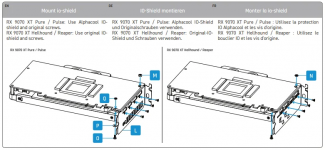
Turned out I had used a wrong spacer at the back, I/O, end of the card which lead to poor mounting pressure. I installed the 2mm "M" while it called for 1mm "N". I chatted w/ someone on Reddit months ago and for their Pure/Pulse (can't remember), the instructions list(ed) the 2mm spacer "M" which gave poor performance; Swapping to 1mm fixed it.

1778835280610.png
I was able to remove the one screw and swap the spacer w/o disassembling the card entirely. While closely examining the card it became obvious the backplate was not parallel with the PCB.

This brought VRAM temps down 20C and Hot Spot 18C while stress testing CPU/GPU @ max 520W load. A more modest reduction @ 320W load while gaming of VRAM 14C and Hot Spot 12C. GPU -> Hot Spot Delta before spacer swap was 39C during 3DMark Speed Way stress, and that was reduced to 20C. (edited since finding some old screen shots)

This is while running only the Eisbaer Pro pump w/ a dual radiator loop.
 
Last edited:
Top