
Eisblock Aurora Acryl GPX-A Radeon RX issue/"validation"

Pyros

New member
Hi, after some issue with my loop flow, I rebuild it entirely (new CPU block,..). Although flow now looks fine, I'm having an issue (that may already have existed) with the GPU block.
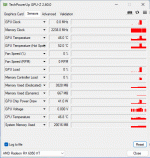
The card is a reference 6950XT, and the idle GPU temp is 46c (51 Hot spot), CPU (7950X3D) temp 46C and water temp is 33c. When I start a GPU stress test (any), the hot spot temp will jump to 105C+ within 2 seconds. If I stop the test, temp will drop just as fast. If I don't stop the test, after some heavy throttling, the system will self power down. GPU memory junction (measured by HWMonitor) stays under 40c.

CPU stress test (prime 95) maxes at about 66c after a few hours (it ran all night with no issues).

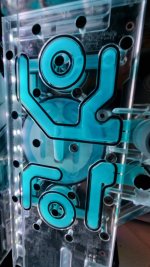
I suspect there is an issue with the contact between the GPU core and the block. As it was assembled at a local computer store (the only thing I didn't do myself, go figure...), I'll have to take it back to them if that is the case, but I wanted some opinions before going through the trouble of disassembling the hard tubing loop, namely if there is some area in the block that should have liquid and does not.

TIA,
 

Attachments

  • 20240827_213702.jpg
    20240827_213702.jpg
    139.7 KB · Views: 6
  • GPUZ.gif
    GPUZ.gif
    17.3 KB · Views: 6

Eddy

Iceman
Staff member
Did you have the problems right from the start, or did the problem only arise after a certain period of time?
If the problem was there from the start, then I would follow your assumption and suggest that the GPU is not making proper contact with the cooler. This could be because the thermal pads were positioned incorrectly, or the tolerances of the GPU and the cooler are to your disadvantage, in which case you may need softer thermal pads or harder ones.
If you remove the cooler, please take a picture of the thermal pads and the thermal paste on the cooler and the graphics card. Then you can make a better assessment.
 

Pyros

New member
Hi, thanks for the reply.

Not from the start - it was assembled about a year ago and I did not have this issue - I did quite some optimization and stability testing (overclocking the GPU, ofc - dropping voltage) - it was fully stable.

Just checked old logs, and with a 330W power load on the GPU was having 77c core /82c hot spot at 2.68Ghz.
 

Eddy

Iceman
Staff member
There are basically only 3 possible solutions to the problem.
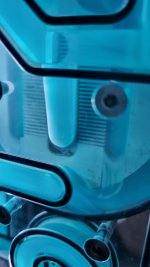
1. the cooling fins are completely blocked, which would not surprise me given the liquid. But I don't actually see this problem in your picture. Take another closer look.
2. your radiator surface area is too small or the total waste heat from all components exceeds the capacity of the radiators. Alternatively, the fans are running too slowly. But I don't think this is the case here, as the system used to run reasonably well.
3. as you have already said, the cooler is not making proper contact with the GPU for some reason. This could be due to dried out thermal paste, pads that have swollen for some reason and are pushing the cooler away from the GPU. Or screws have come loose.
Either way, I would dismantle the cooler and take a look at all the marks.
 

Pyros

New member
Hi Eddy,

Thanks for your input. The coolant is DP Ultra blue (and it is of a far darker blue than it looks there), although the photo is a bit deceiving as it looks more like it is a pastel coolant, but I avoid those.

1) I've attached another, closer pic. As I'm not sure what to look for, well. But clogging it may be :/

2) the system has 3 x 240 mm and 1 x 360, thin rads. Total 12 assorted fans (NBs, Arctic and Noctua), low speed (~600 RPM), silent, all pushing air out of the case (it is a slightly modded TT 500). I gave it a lot of rad surface to enable the use of slow, silent fans. As you said, not likely the case as it should have decent headroom (and the temp rises too fast anyway). On a side note, the room temp (both now and the reference from last year) are during southern Europe summer, so it should be about 28c to 30c.

3) Yes, one of the reasons you mentioned is the most likely issue. Anyway, I've taken the block+card back to the store that originally assembled it, and will update with their findings (it will take a while as they told me they are with a significant backlog for tech work).

Once again, thanks for the feedback and help.
 

Attachments

  • 20240827_213940.jpg
    20240827_213940.jpg
    761 KB · Views: 6

Eddy

Iceman
Staff member
I am generally not a fan of colored coolants. Every colored liquid contains color particles that do not dissolve completely in the water. If these color particles start to stick together, they will eventually become so large that problems can (not necessarily) occur. And if you ever want to change the color, you must first disassemble all radiators and clean them thoroughly, because the paint is deposited everywhere, even in the radiators, etc.! I'm not a fan of that. But everyone has to decide for themselves. Of course it looks great, no question.

1. it is difficult to see from the pictures whether the fins are clogged or not. What I can see is that there is some sediment in the fins, but not so much that I would consider it a serious problem at the moment. But it certainly won't get any better in the future. But that's just an assessment, not a fact.

2. you have enough cooling surface. You can try turning up all the fans and opening the side panels of the case. If the temperatures are then significantly better, then you have found your problem. Then there doesn't seem to be good ventilation. But I still think that is rather unlikely. But purely out of curiosity, I would give it a try myself.

3. yes, I am still of the opinion that this is the problem. You can take a picture of the imprints on the PCB and the cooler and upload it here.
 

Pyros

New member
Giving some sort of closure, I finally got my card back (sure took them long...). And is it working flawlessly now, better than I first installed it. In stress tests is maxing out at 63c and idle temp is 35c. While I don't know exactly what type of work was done (if they cleaned or reassembled the block), it it looking good now.

Thanks for all the help!
 
Top