Help Needed: Custom Loop Cooling Plan for Dual Xeon + 4× Tesla V100 32GB PCIe Server

JayBase

New member
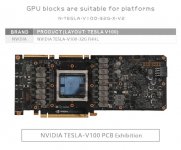
Help needed: custom-loop cooling for 24/7 AI/compute server, no OC, no subzero/TEC/chiller. Case: Cooler Master Cosmos Alpha C700-KGNN-S00. Board: Supermicro X11DPi-NT / MBD-X11DPI-NT, Intel C622, dual LGA3647, EEB, dual 10GbE. CPUs: 2× Xeon Platinum 8273CL, 28C/56T, 165W each. GPUs: 4× NVIDIA Tesla V100-PCIE-32GB PCIe FHHL passive OEM, 32GB HBM2; SKU 900-2G500-0010-000 S, board P/N 699-2G500-0022-400 L. Candidate GPU block found: N-TESLA-V100-32G-X-V2 for NVIDIA TESLA-V100-32G FHHL.

Memory/storage: 4× Intel Optane PMem 512GB NMA1XBD512GQS, 8–12× SK hynix HMA84GR7MFR4N-UH 32GB ECC RDIMM, ASUS Hyper M.2 Expansion Card already owned, 4×4TB NVMe via 2× OCuLink/x16 bifurcation, plus 1×4TB SSD, 2×512GB SATADOM RAID0, 10TB HDD, 2× Coral USB TPU. PSU: Super Flower SF-2000F14HP 2000W.

Need advice: exact CPU/GPU blocks, internal radiator layout, pump/res, loop split, NVMe airflow, flow/temp displays, clear/acrylic options if reliable.
 

Eddy

Iceman
Staff member
Basically, I cannot put together a “perfect” system for you, as it is currently not clear what exactly needs to be cooled. You have already selected GPU coolers, and I assume the CPUs should also be cooled. However, it is unclear what should happen with the remaining components, such as hard drives, HDDs, etc. For some of these components, we do not offer coolers.

I also cannot say how much space is actually available in the mentioned case for radiators, reservoir, and pump. You would need to check this yourself. There are over 4,000 cases on the market, and we cannot test every single one.

Regarding the reservoir, you are generally free to choose any model, as long as it fits inside the case and is combined with an Apex or D5 pump. For the CPU cooler, you can use the XPX Pro. There are several variants available, and it fits the socket.

You need at least two fittings per component. The tubing size you use is up to you. A common size is 13/10 mm, while in servers we usually use TPV tubing in 12.7/7.6 mm. The fittings then need to match the tubing size.

For the radiator surface, I cannot give a binding recommendation without checking the case in detail. With this amount of heat output, you should use at least 3x 360 mm ST30 radiators. However, this setup would not be particularly quiet. Therefore, I would rather consider an external solution such as a Nova station, for example with an external radiator like article 14349.

So, in general, you will need to check yourself what fits into your case and which components you actually want to cool. Unfortunately, I cannot take over this planning completely for you.
Once you have put together a configuration, I can give you tips and advice. That is no problem.
 

JayBase

New member
Basically, I cannot put together a “perfect” system for you, as it is currently not clear what exactly needs to be cooled. You have already selected GPU coolers, and I assume the CPUs should also be cooled. However, it is unclear what should happen with the remaining components, such as hard drives, HDDs, etc. For some of these components, we do not offer coolers.

I also cannot say how much space is actually available in the mentioned case for radiators, reservoir, and pump. You would need to check this yourself. There are over 4,000 cases on the market, and we cannot test every single one.

Regarding the reservoir, you are generally free to choose any model, as long as it fits inside the case and is combined with an Apex or D5 pump. For the CPU cooler, you can use the XPX Pro. There are several variants available, and it fits the socket.

You need at least two fittings per component. The tubing size you use is up to you. A common size is 13/10 mm, while in servers we usually use TPV tubing in 12.7/7.6 mm. The fittings then need to match the tubing size.

For the radiator surface, I cannot give a binding recommendation without checking the case in detail. With this amount of heat output, you should use at least 3x 360 mm ST30 radiators. However, this setup would not be particularly quiet. Therefore, I would rather consider an external solution such as a Nova station, for example with an external radiator like article 14349.

So, in general, you will need to check yourself what fits into your case and which components you actually want to cool. Unfortunately, I cannot take over this planning completely for you.
Once you have put together a configuration, I can give you tips and advice. That is no problem.
Needs cooling:
2 x Xeon Platinum 8273CL LGA3647
4 x NVIDIA TESLA-V100-32G FHHL PCIe Cards (I haven't selected GPU coolers yet.)
Possibly the Motherboard chip-set (AI server under constant heavy load)


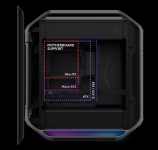
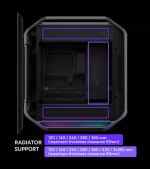
cosmos-alpha-img-06-l-1-2.pngcosmos-alpha-img-05-s-1-2.png
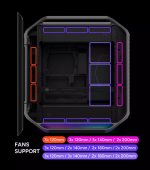
cosmos-alpha-img-04-s-1-2.pngcosmos-alpha-img-07-s-1-2.png
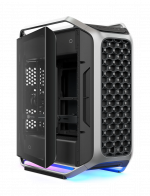
cosmos-alpha-gallary-02.pngv100 32.jpg
Product Name COSMOS ALPHA
Model Number C700-KGNN-S00
Materials - Side Panel (Left / Right) Tempered Glass / Metal
Dimensions (L x W x H) 669 x 330 x 639 mm (Incl. Protrusions), 579 x 260 x 582 mm (Excl. Protrusions)
Volume 88 L (no panel / protrusions / feet)
Volume 140 L (with panel / protrusions / feet)
Motherboard Support Mini-ITX / Micro-ATX / ATX / E-ATX / EEB
Power Supply Support ATX
PCI Expansion Slots 8
Drive bay support - 5.25" Drive Bays 0
Drive bay support - 2.5" / 3.5" Drive Bays (or SSD) 2 or 2 (CPU Cooler under 165 mm)
Preinstalled Drive Bays - 5.25" Drive Bay 0
Preinstalled Drive Bays - 2.5" / 3.5" Drive Bays (or SSD) 2 or 2 (CPU Cooler under 165 mm)
Preinstalled Fan (Fan dim./ Fan speed/ LED color/ Fan Connector ) - Front 2x 200x38 mm (Non-ARGB)
Preinstalled Fan (Fan dim./ Fan speed/ LED color/ Fan Connector ) - Rear 1x Mobius 120x25 mm (Non-ARGB)
Fan Support - Front 3x 120mm / 3x 140mm / 2x 200mm
Fan Support - Top 3x 120mm / 2x 140mm / 2x 180mm / 2x 200mm
Fan Support - Rear 3x 120mm
Fan Support - Bottom 3x 120mm / 2x 140mm / 2x 180mm / 2x 200mm
Fan Support - Side Mount 3x 120mm / 3x 140mm / 2x 180mm / 2x 200mm
Radiator Support - Top 120 / 140 / 240 / 280 / 360 mm (maximum thickness clearance 93mm)
Radiator Support - Bottom 120 / 140 / 240 / 280 / 360 mm (maximum thickness clearance 93mm)
Radiator Support - Side Mount 120 / 140 / 240 / 280 / 360 / 420 / 3x360 mm (maximum thickness clearance 80mm)
Dust Filters Yes, Removable Filters
Clearances - CPU Cooler 186 mm
Clearances - Power Supply 240 mm
Clearances - Graphics Card 400 mm
Cable Routing - Behind Motherboard Tray 53 mm
Included Accessories VGA card holder
Included Accessories Decorative cover
Included Accessories Right side cable cover
Size Full Tower

 
Last edited:

JayBase

New member
Basically, I cannot put together a “perfect” system for you, as it is currently not clear what exactly needs to be cooled. You have already selected GPU coolers, and I assume the CPUs should also be cooled. However, it is unclear what should happen with the remaining components, such as hard drives, HDDs, etc. For some of these components, we do not offer coolers.

I also cannot say how much space is actually available in the mentioned case for radiators, reservoir, and pump. You would need to check this yourself. There are over 4,000 cases on the market, and we cannot test every single one.

Regarding the reservoir, you are generally free to choose any model, as long as it fits inside the case and is combined with an Apex or D5 pump. For the CPU cooler, you can use the XPX Pro. There are several variants available, and it fits the socket.

You need at least two fittings per component. The tubing size you use is up to you. A common size is 13/10 mm, while in servers we usually use TPV tubing in 12.7/7.6 mm. The fittings then need to match the tubing size.

For the radiator surface, I cannot give a binding recommendation without checking the case in detail. With this amount of heat output, you should use at least 3x 360 mm ST30 radiators. However, this setup would not be particularly quiet. Therefore, I would rather consider an external solution such as a Nova station, for example with an external radiator like article 14349.

So, in general, you will need to check yourself what fits into your case and which components you actually want to cool. Unfortunately, I cannot take over this planning completely for you.
Once you have put together a configuration, I can give you tips and advice. That is no problem.
Please, I dont know liquid cooling at all, You told me what CPU blocks to look at, and I like the Acrylic one. As I want the whole setup to look nice as well as be functional. But I cant find a GPU block, I dont know what size pump or reservoir or what fittings, I am completely in the dark here.
 

Eddy

Iceman
Staff member
@JayBase
Please wait until tomorrow. This takes a bit longer to explain everything and i am very busy today. So sorry. Tomorrow i will answere.
 

Eddy

Iceman
Staff member
We do not offer a suitable graphics card cooler for these graphics cards, so I cannot help you with that.

For the CPU cooler, you need an “XPX Pro”. Which one you choose does not matter. That is purely a matter of taste, as the differences are basically only visual.

When it comes to fittings, it is actually quite simple. In our shop, under the “Fittings” category, you will find direct subcategories with all the available sizes. The most commonly used size is 13/10. The 13 stands for the outer diameter in millimeters, and the 10 stands for the inner diameter in millimeters. The matching tubes always have the same size in their name and can also be found in the corresponding subcategory sorted by size.

You always need two fittings per component. Every cooler, radiator, or reservoir has one inlet and one outlet. So you need two fittings for each radiator, each CPU cooler, each graphics card cooler, and so on.

You may also need adapters. The tube fittings are screwed directly onto these adapters. These can be angled adapters, extensions, or other adapter types and shapes. I cannot tell you exactly which ones you will need. That only becomes clear when you build the system, or if you plan and draw everything out very precisely beforehand.

When it comes to the pump, there is hardly any choice left on the market. Nowadays, pumps are almost always included with the reservoir. Here you can choose what you prefer. However, it should include an Apex pump, which is a D5 variant.

DDC pumps are slowly disappearing from the market, and DC-LT pumps are far too weak for your system.

You can check how many radiators you can install in the description of your case. However, with four graphics cards producing a total of around 1200 W of heat, plus two CPUs producing another 330 W of heat together, the cooling will be very loud in that case. The case is simply not designed or intended for something like this. Even though it looks very large from the outside, it is actually quite small and tight on the inside.

If you have no experience with water cooling, want to install everything in this case, and also want it to look good, then you should look for someone with experience who can build it for you. Alternatively, you should take the time to read up on the topic.

What we definitely will not do here is provide a complete configuration down to the very last detail. You will need to do a certain amount of the work yourself. We are happy to help with specific questions, but not with a complete configuration including every single detail.
 
Top