My Alphacool Core 70 came with a visual defect

AlexOffel

New member
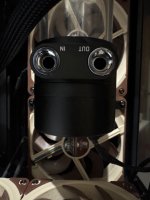
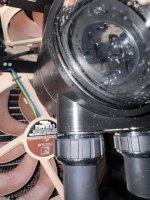
I cant figure where the In/Out port should be, I’m not sure if they put the whole ring upside down or just printed incorrectly the labels! There’s nothing on the manual about it and it doesnt seem posible to disassemble it to flip it… Im so confused

image.jpg

Also can someone please tell me what the logic of this is? Like do I need to plug the In port to my cpu waterblock and out to my radiator? Because neither my rad that is a Nexos HPE or waterblock have a In/Out label so this is really confusing
 
Last edited:

Eddy

Iceman
Staff member
Hi,

every cooler, every reservoir, and every distro plate has specific IN and OUT ports. Radiators are the only exception, because it does not matter which port the water enters or exits through.

With CPU coolers, the water has to enter through the correct port so the cooler can work properly, because there is a jet plate system inside. The same applies to GPU coolers. On CPU coolers, IN and OUT are usually marked inside the ports, so just take a look inside. On GPU coolers, the port closer to the monitor connections is always the IN port, and the other one is the OUT port. Otherwise, the cooling performance will drop significantly.

On the reservoir, you have an IN and an OUT because the pump can only pump water out through one specific port. The other port leads back into the reservoir.

What you connect to what does not matter. The only important thing is that you follow the correct water flow direction. Whether you go from the reservoir into a cooler, either CPU or GPU, or into a radiator, does not matter. The water just has to enter through IN and leave through OUT.
 

AlexOffel

New member
Hi,

every cooler, every reservoir, and every distro plate has specific IN and OUT ports. Radiators are the only exception, because it does not matter which port the water enters or exits through.

With CPU coolers, the water has to enter through the correct port so the cooler can work properly, because there is a jet plate system inside. The same applies to GPU coolers. On CPU coolers, IN and OUT are usually marked inside the ports, so just take a look inside. On GPU coolers, the port closer to the monitor connections is always the IN port, and the other one is the OUT port. Otherwise, the cooling performance will drop significantly.

On the reservoir, you have an IN and an OUT because the pump can only pump water out through one specific port. The other port leads back into the reservoir.

What you connect to what does not matter. The only important thing is that you follow the correct water flow direction. Whether you go from the reservoir into a cooler, either CPU or GPU, or into a radiator, does not matter. The water just has to enter through IN and leave through OUT.
Ok thanks for explaining that, but can you tell me about the bad print on my Core 70? The In Out labels are not accurate, they’re upside down or had an error when printinh them and have no clue how to know now wich is wich..
 

Eddy

Iceman
Staff member
Someone messed up during assembly and attached the cover with IN and OUT the wrong way around. It is a thin aluminum plate that is only glued in the middle. If you carefully go in from the side with a thin knife or something similar, you can simply pry the plate off and turn it around.
 

AlexOffel

New member
Someone messed up during assembly and attached the cover with IN and OUT the wrong way around. It is a thin aluminum plate that is only glued in the middle. If you carefully go in from the side with a thin knife or something similar, you can simply pry the plate off and turn it around.
I see, does that mean the product is not new and a class B one? I bought it brand new for full price, seems odd to me since this should happen only on class B items or am I wrong.

Thansk for answering all my questions, I appreciate you taking the time for it man.

About the In/out ports on rads, since you said it doesnt matter, can I go from pump to Cpu In to In port and then from Out port of my CPU to Radiator? From the other port of the rad go to my RAM block?
 

Eddy

Iceman
Staff member
That does not necessarily mean it is B-stock. It is also possible that this slipped through during production and QC. Of course, that is unfortunate and should not happen, but it does not mean that it is B-stock.
If the reservoir had already been used before, you would see various signs of use. But to get straight to the point: this is also a valid reason for an exchange, even if it is a rather silly and annoying one. Sorry about that.

Regarding your question about the connections: yes, you can do it that way. As mentioned, the way you connect everything does not really matter. The important thing is only that you go from, for example, the OUT port of a cooler into the IN port of a reservoir, or into a radiator, etc.

The order in which all components are connected is basically completely irrelevant. However, if you want to optimize the loop as much as possible, you would not go directly from the CPU to the GPU or from the GPU to the CPU. You can do that without any real issue, but it may cost one of the two components a little bit of cooling performance. However, we are only talking about maybe 1–2°C, not more than that.

Other than that, feel free to build everything the way you prefer.

You do not need to thank us, that is what we are here for.
 

AlexOffel

New member
That does not necessarily mean it is B-stock. It is also possible that this slipped through during production and QC. Of course, that is unfortunate and should not happen, but it does not mean that it is B-stock.
If the reservoir had already been used before, you would see various signs of use. But to get straight to the point: this is also a valid reason for an exchange, even if it is a rather silly and annoying one. Sorry about that.

Regarding your question about the connections: yes, you can do it that way. As mentioned, the way you connect everything does not really matter. The important thing is only that you go from, for example, the OUT port of a cooler into the IN port of a reservoir, or into a radiator, etc.

The order in which all components are connected is basically completely irrelevant. However, if you want to optimize the loop as much as possible, you would not go directly from the CPU to the GPU or from the GPU to the CPU. You can do that without any real issue, but it may cost one of the two components a little bit of cooling performance. However, we are only talking about maybe 1–2°C, not more than that.

Other than that, feel free to build everything the way you prefer.

You do not need to thank us, that is what we are here for.
Nah I’ll keep the Core 70, did exactly what you said and flipped the cover, now it shows correctly! But thanks for the transparency.

Yeah now I understand it. That makes things easier since I thought I had to plug each tube and waterblock with the correct In/out port, if it’s only from pump to the waterblock that I need to be careful to put in the right port then it makes the rest easy.

And one must have some principles and education even if this is your job guys! It’s how I was raised and I’m grateful for you putting the time to answer. Greetings and have a wonderful day!
 

Eddy

Iceman
Staff member
Great, I’m glad we were able to clear that up. Yes, friendliness is of course always appreciated, and a thank you is always nice to receive.
I just wanted to make it clear that we always try to answer everything, and that this is what we are here for.

We are German, so we tend to be a bit more direct and use fewer friendly words. :cool::LOL:

Have a nice week.
 

AlexOffel

New member
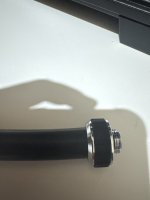
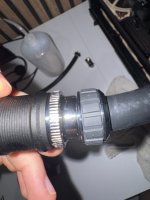
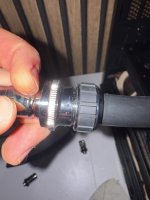
One more thing Eddy, the Apex fittings dont seem to hold that good the tubes. Did I buy the incorrect fittings for this loop?

Like there’s nothing to secure the grip onto the fitting and make aure it doesn’t slip
 

Attachments

  • image.jpg
    image.jpg
    571.3 KB · Views: 2

Eddy

Iceman
Staff member
Which Apex fitting exactly is this? To me, it looks a bit like a hard tube fitting, not a soft tube fitting. However, it is difficult to tell from the outside, as they look almost identical externally.

Which article number did you purchase, and which exact tubing are you using?
 

AlexOffel

New member
Which Apex fitting exactly is this? To me, it looks a bit like a hard tube fitting, not a soft tube fitting. However, it is difficult to tell from the outside, as they look almost identical externally.

Which article number did you purchase, and which exact tubing are you using?

Alphacool Apex Grip SoftTube fitting 16/10mm G1/4 chrome​

  • Article no.: 14924
Oh man, they definetely dont hold the tubes that good. I literally had to put a lot of force to secure the tube into the fitting holding it against the floor and applying force to make sure it was sealing and when I slightly bent it to reach the pump it slipped from the fitting. Damn
 

Eddy

Iceman
Staff member
If the tube is cut cleanly and straight, pushed fully onto the fitting, and the union nut is tightened properly, they hold well enough.

Yes, you can pull the tube off with a sudden tug, but that is possible with almost all fittings. The pressure inside the loop is a maximum of around 0.4–0.5 bar, which is quite low. The fittings can handle that without any issue.
 

AlexOffel

New member
If the tube is cut cleanly and straight, pushed fully onto the fitting, and the union nut is tightened properly, they hold well enough.

Yes, you can pull the tube off with a sudden tug, but that is possible with almost all fittings. The pressure inside the loop is a maximum of around 0.4–0.5 bar, which is quite low. The fittings can handle that without any issue.
Yep ended fixing it with a clean cut!

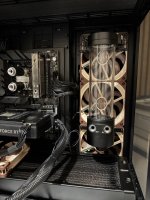
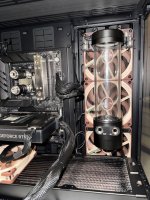
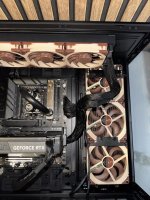
Sorry to have to ask you again about this, but contacted my waterblock manufacturer and he told me that my CPU WB has the IN port on the bottom and OUT on top (attached images of my build). And for RAM WB it doesnt matter wich port is used as In/Out.

My question comes as someone on OCN told me that I need to go very strictly from “OUT port” of reservoir (Alphacool Core 70) to “IN” port of the CPU Waterblock. And then OUT port of CPU to IN of RAM. Can I have your take on this as if it has any truth to this claim or not?

Sorry for being so paranoid lol but better be safe than sorry.
 

Attachments

  • Loop.jpeg
    Loop.jpeg
    313.1 KB · Views: 1
  • Loop 2.jpeg
    Loop 2.jpeg
    403.4 KB · Views: 1

Eddy

Iceman
Staff member
RAM coolers do not have a jetplate, so the flow direction does not matter. All modern GPU and CPU coolers use jetplate systems that require a specific flow direction. A RAM cooler is simply a basic flow-through cooler without a jetplate and only a few coarse fins.

The guy from the OCN forum is talking complete nonsense here. The order is completely irrelevant. In general, I would be very careful with statements from forums, YouTube, TikTok, etc. The amount of absolute nonsense being spread there every day, some of it potentially dangerous, has become completely crazy.

More and more people are ending up in our support because of extremely bad advice, even from some big influencers and so-called tech YouTubers. They actually believe that nonsense and, in some cases, even damage their hardware because of it. 90% of these people and forum users have absolutely no idea what they are talking about.
 

AlexOffel

New member
RAM coolers do not have a jetplate, so the flow direction does not matter. All modern GPU and CPU coolers use jetplate systems that require a specific flow direction. A RAM cooler is simply a basic flow-through cooler without a jetplate and only a few coarse fins.

The guy from the OCN forum is talking complete nonsense here. The order is completely irrelevant. In general, I would be very careful with statements from forums, YouTube, TikTok, etc. The amount of absolute nonsense being spread there every day, some of it potentially dangerous, has become completely crazy.

More and more people are ending up in our support because of extremely bad advice, even from some big influencers and so-called tech YouTubers. They actually believe that nonsense and, in some cases, even damage their hardware because of it. 90% of these people and forum users have absolutely no idea what they are talking about.
Thank god I made sure to ask you lol, some people were disagreeing with him so that made me skeptical. But you’re absolutely right on this matter, I’ll avoid asking in forums because the disparity of takes I get is insane.

I hope you bear with me Eddy, I think I’m about to finish the build. Right now I’m doing the tubing wich should be last step before turning PC. I have some questions:

1. Right now I’m gonna connect first Pump from OUT port to superior RAM waterblock hole, and from bottom hole connect it to OUT port of my CPU waterblock. In this last step, should I connect it better to the IN port of CPU?

2. When routing tubes, do I go from OUT port to IN ports? Or it needs to be OUT to OUT port / IN to IN ports from Pump to components that have jet plates? I tried to find something about this and there’s notying stated anywhere. The manual of the Alphacool Core 70 doesn’t mention this neither.

3. The Alphacool Core 70 is an absolute tank, I have some clearance issues and it doesn’t fit on my fan bracket. Is there any accesory I can buy from Alphacool to hold this reservoir on the top radiator bracket where I have some clearance or attach it on the glass panel?
 

Attachments

  • Photo.jpeg
    Photo.jpeg
    353.6 KB · Views: 1
Last edited:

Eddy

Iceman
Staff member
The problem with forums is that there are some people who really do have very good technical knowledge, but there are simply too many who think they know something, while actually having no idea. And unfortunately, you often cannot clearly tell who actually knows what they are talking about and who does not. It used to be completely different. I am 47 and have been around since the early days of forums. Unfortunately, a lot has changed for the worse.

But regarding your questions:

  1. In general, you should always pay close attention to IN and OUT on coolers and use them exactly as intended. Otherwise, you will lose quite a bit of cooling performance because the cooler can no longer work properly if the water comes from the wrong direction. The whole jetplate system will no longer function as intended. The jetplate ensures that the water is briefly accelerated and evenly pushed through all the cooling fins. If the water comes from the other direction, it simply flows however it wants. So please always use IN and OUT correctly.
  2. Yes, from an OUT port you always need to go to an IN port. Otherwise, you will not get proper water flow. Of course, this only applies to components that have a clearly defined IN and OUT. As mentioned, with RAM coolers and radiators, it does not matter how you connect them. Water just needs to go in through one port and out through the other.
  3. Do you mean mounting it directly underneath the top radiator? Or am I misunderstanding you here? I assume you are probably hitting the AIO tubes at the top? Can you not simply turn the radiator around? Or position the radiators differently, basically swap both radiators? Then you could mount the reservoir onto the AIO radiator. We do not have a bracket that moves the Core 70 further down, for example. And mounting it hanging from the top is not really a good idea. In that case, the reservoir would have to be filled completely to the top so that the pump does not draw in air.
 

AlexOffel

New member
The problem with forums is that there are some people who really do have very good technical knowledge, but there are simply too many who think they know something, while actually having no idea. And unfortunately, you often cannot clearly tell who actually knows what they are talking about and who does not. It used to be completely different. I am 47 and have been around since the early days of forums. Unfortunately, a lot has changed for the worse.

But regarding your questions:

  1. In general, you should always pay close attention to IN and OUT on coolers and use them exactly as intended. Otherwise, you will lose quite a bit of cooling performance because the cooler can no longer work properly if the water comes from the wrong direction. The whole jetplate system will no longer function as intended. The jetplate ensures that the water is briefly accelerated and evenly pushed through all the cooling fins. If the water comes from the other direction, it simply flows however it wants. So please always use IN and OUT correctly.
  2. Yes, from an OUT port you always need to go to an IN port. Otherwise, you will not get proper water flow. Of course, this only applies to components that have a clearly defined IN and OUT. As mentioned, with RAM coolers and radiators, it does not matter how you connect them. Water just needs to go in through one port and out through the other.
  3. Do you mean mounting it directly underneath the top radiator? Or am I misunderstanding you here? I assume you are probably hitting the AIO tubes at the top? Can you not simply turn the radiator around? Or position the radiators differently, basically swap both radiators? Then you could mount the reservoir onto the AIO radiator. We do not have a bracket that moves the Core 70 further down, for example. And mounting it hanging from the top is not really a good idea. In that case, the reservoir would have to be filled completely to the top so that the pump does not draw in air.
1. Understood chief, I’ll do so.

2. Finally, thanks a lot! You don’t imagine how much I was searching about this simple thing but couldn’t find anything on it hahah. Last question about this. If I want to cool RAM first (mostly because of tube routing), if I go from Reservoir OUT port to RAM and then from RAM 2nd port to CPU IN port, does this still count as OUT to IN connection from Reservoir to CPU? Or should I strictly go from Reservoir OUT to CPU IN?

3. No, not underneat the top AIO radiator, theres a little space on top bracket because the AIO rad is only 360mm, my idea was to buy an accesory that allows to hold the reservoir from that little space. Attached a photo to make it more clear. Also even if I turn around the AIO rad, the Core 70 doesnt fit sadly.

I went with the AIO rad on top because I’m going push pull on the Alphacool rads, one at the bottom and the other on side panel, both in push pull. I went with Lianli Dynamic O11 XL case thinking it would allow me to go as wild as 3 rads on push pull but wasnt the case. I’ll have to get creative an go external rad or 3D print a support for the reservoir.
 

Attachments

  • Mark red.jpeg
    Mark red.jpeg
    246.3 KB · Views: 1

Eddy

Iceman
Staff member
Oh, I am the boss? Oh no... better not. When I see that our CEO has to be available day and night, almost every day, and even has to be reachable while on vacation, that would be far too much work for me.

To be honest, I never really thought about complete beginners having questions like this. I have been constantly involved with PCs since I was 14, both as a hobby and professionally. So that would be 33 years now, since I am 47. But since we are currently working on a kind of lexicon with extensive information about everything, I will have to bring this up.

Regarding point 3:

Ah, I see, you mean hanging. No, we do not offer anything like that at all. I also would not know of any parts we offer that could be repurposed for something like this. As far as I know, nobody has ever asked for something like that before either.

Another question: why not cool the CPU with the DIY loop as well? That would only require the CPU cooler and two additional fittings. Then you could leave out the top radiator or replace it with a shorter 240 mm radiator. Yes, that would cost more money again, but parts like fittings and radiators basically never break.

And the current Core and Apex CPU coolers will still receive updates for new sockets. The new Intel socket will use the same mounting system, and according to the current information, AM6 should not require a different mounting system either. In the worst case, only different spacers might be needed. This means you could use the cooler for another 6 years or even longer. The AIO will not last that long.

But I have to admit, I am not a fan of AIOs. I would rather use an air cooler than an AIO, because I know the actual prices and the internal construction of the AIOs that almost everyone offers.

Oh, one small addition about radiators just came to mind.
Normally, all ports are on one side. However, we also have radiators that have a fill port or drain port on the other end. Please do not use this as IN or OUT. It is really only there so that you can fill or drain directly through the radiator, or you can screw in a temperature sensor there.

 
Top