
First time water cooling - advice for full loop

indyJ

New member
Hello.

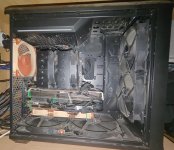
I have an AMD 9950X on a Asus ProArt Mobo, an AMD 6950XT + RTX 5070 TI, 128 GB of RAM and 9 TB worth of SSDs (I put these here just to piss off Sam Altman :) ) in a Fractal Torrent Mid Tower. See picture attached (and don`t mind the dust).
The 6950XT is sandwiched between the Noctua NH-D15 cooler and the 5070 TI and it is choked pretty badly.

I have never water cooled PCs, but I have been building my own PCs for the past 25+ years.

I am looking to cool:

9950X with a Mycro Direct-Die PRO V1 from Thermal Grizzly that I already have brand new. The 9950X is already delidded and has the NH-D15 sitting on its die with the dedicated Noctua/Thermal Grizzly adapter.
+
The MSI GeForce RTX™ 5070 Ti 16G VENTUS 3X OC (V531-092R) --> using the 10248

both on the same loop. I will not be cooling the 6950XT.

I would like to:
- put a radiator in front of the case in between the 2 x 180mm Fractal fans and the GPU, I have a clearance of ~90mm there. I would use the 180mm radiator just to fully utilize those fans. What say you? :)
- have a big external radiator as well. I`m looking for the optimal thickness vs size vs heat dissipation option. Since it`s external, size doesn`t matter, I will frankenstein it to the desk to have it stand up straight, I do have the space for it.
- a pump that I think I would attach in front of the 140mm poop-colour Noctua exhaust fan (same place where the Noctua NH-D15 is standing right now). A pump with reservoir I guess?
- have reliable/best "quick disconnects" for individual components so that I can easily run maintenance and swap components if need be.
- I do not know which is the optimal tube thickness and ...type of tube?, please tell me.
- do I require extra fittings?
- do I need a water temp sensor and/or flow meter?


I don`t care about RGB or coolant colour nonsense. I do care about silence and efficiency :).

I thank you
 

Attachments

  • PC.jpg
    PC.jpg
    595 KB · Views: 5
Hi,

I’ll go through your questions below.

You’ll need to measure the available space to see which radiator will fit in the front. You can find the dimensions in the radiator listings in our shop. However, we only offer 200 mm radiators. These also support 180 mm fans, but they are still 200 mm radiators. I’m not sure whether they’ll fit in your case, and I have some doubts.

A 1080 XT45 Nova radiator (14349) will be sufficient for your system. If you want something bigger, there’s the 1260 SuperNova (14351). With either of these, you won’t need an internal radiator.

You’ll definitely need a reservoir. If you’re going with an external radiator, I’d skip the front radiator and use that space for a decent-sized reservoir instead of squeezing one into the small fan mounting area.

Our best quick disconnects are the BLH1A series and the upcoming BLH2A series.

For tubing, I’d always go with EPDM or TPV. Clear or transparent tubing is generally PVC with plasticizers that can leach out over time. These can then accumulate in the cooling fins and clog them.

Common tubing sizes are 13/10 mm and 16/10 mm. Which one you choose comes down to personal preference. The 16/10 mm tubing has a larger outer diameter, making it stiffer, but the inner diameter is the same.

The fittings you need will depend on how you want to route everything. Or is there something more specific you’re asking about here?

Whether you need sensors is up to you. Personally, I never use them, while others install a whole range of sensors. It depends on your own requirements.
 
Hi.

Thank you for taking the time to reply.

The 14187 Nexos 180mm explicitly says 403 x 182 x 45mm.
What I'm getting at is that I do have enough hight, I need to make sure that it doesn't go much wider for the front of the case as I plan to just use the existing 2x180mm fans.

As for the external one, I can't fit a Nova there as much as I'd love to, unless I put it along one of the walls but then there will be no air circulation, so I don't think that is a good option.

I was thinking more along the lines of a 14395 having 443 x 200 x 87mm.
I can put 2x200mm fans on it. I don't see a 3x200 option and also the price looks ok compared even to a 45mm 3x180mm Nexos.

Regarding pump and reservoir: I was looking to have the combo.
Except the form that they come in, are there any other functional differences between the Eisbecher Aurora D5 and Eisstation D5?

Would one D5 pump be enough to push liquid through both a 2x180 and a 2x200mm radiators at the same time?

Also, I am not grasping the thermal capacity of a 2x180 or a 2x200 radiator considering the 9950x and the RTX5070 TI on the same loop.
In other words, would just one 2x180mm radiator be enough for something like this or i would be walking the limit of acceptable?

Regarding fittings: I suspect the thread size are standardized so I wouldn't need different fittings for a radiator and for the Thermal grizzly Direct die Pro?

Thanks
Indy
 
Hi,

Oh, I have to admit that 14187 is such an old and rarely sold radiator that I completely forgot about it. My mistake.

A Nova radiator only needs around 3 cm of clearance behind it for sufficient airflow. More space is certainly better, but it won’t make a huge difference beyond that. Still, yes, it’s a large radiator.

If I understand you correctly, you want to install the 14187 internally and use the 14395 externally? If so, I would suggest the 14350 for the external radiator. Matching feet are available, and together with the internal radiator, it will easily be enough for your setup. Even with both graphics cards, that would be more than enough.

These are the feet I mean. They’re simple and functional, and let you stand the radiator upright so it takes up less space.

Alphacool universal radiator feet

As for fittings, everyone uses G1/4" threads. That’s the standard in PC water cooling. You just need to make sure the fittings have a thread length of 5 or 5.5 mm. Some no-name manufacturers and very old fittings use 7 mm threads. These are hardly used anymore because they cannot be screwed in fully on some products. That’s all you need to watch out for regarding the threads.

For tubing, 13/10 mm and 16/10 mm are the standard sizes. The 19/13 mm size has virtually disappeared from the market, and its fittings are so bulky that they often won’t fit next to each other on components such as CPU blocks.

There are no major differences between the reservoirs in terms of their basic function. They all work on the same principle. The choice mainly comes down to appearance, capacity, and mounting options. However, make sure you choose a version with an Apex pump.

In the Eisstation, the pump cable is a very tight fit, so you need to take a little care with it. The Eisstation is quite an old product, but it does its job and has a large filling opening at the top.
 
Hi.

Since you mentioned the required clearance space of the Nova radiator, it would actually make sense to use a Nova instead of two separate radiators. That would save me around 100 coconuts :).
And I can also use the feet.

Could you clarify what is the difference between the IT and the OT versions of the BLH1A quick release?
 
IT = internal thread, meaning you can screw other fittings into it.
OT = external thread, meaning you can screw the quick disconnect directly into a radiator, for example, just like a fitting.

You save not only coconuts (which would be an interesting currency), but also fittings and work. And with a Nova, you have more than enough cooling capacity for everything.
 
Thanks!

So to summarize, this is the list of componente I need:

1) 10248 GPU block
2) 5100117 13/10 EPDM tube
3) 17228 6 pack G1/4 compression fittings
4) 14351 Nova 1260 radiator
5) 15381 Core 200 Aurora Reservoir with Apex pump
6) 17075 Right angle compression fittings 90 degrees (3)
7) 29943 Radiator feet
Extra: quick release fittings (I'll need a pair most probably)

Tell me if you see anything that would not fit :)

Also, best collant recommendation? Again, don't care about colour, just efficiency.

Thank you
Indy
 
Could you please put together a complete shopping cart in the shop and save it? A green box will then appear with a link. Please copy that link and paste it here. That makes it easier for me to check everything and keep track, especially the number of fittings etc.
 
That looks almost right. You’re still missing one fitting. You need two per component, so six in total, plus another four for the quick disconnects. You currently only have nine in your cart.

I would also add this PSU jumper plug to your order.

Alphacool Core ATX 24-pin jumper plug

It lets you run the PSU to power the pump without starting the whole PC. This helps with filling the loop and checking for leaks. If anything does drip, your hardware won’t be powered and would, at worst, get wet. Hopefully that won’t happen.

One thing to keep in mind is that EPDM tubing is somewhat stiff, so the compression collars on the fittings won’t screw down quite as far as they would with softer tubing. That is perfectly normal and fine, although it can look a little odd. Don’t let it throw you off.
 
Hi.

Is the TPV tube easier to use?
I really don`t care about how it looks. I want to make this is easy as possible to maintain.

I think I will fit two OT quick releases directly on the CPU water block. Other 2 x IT quick releases will allow me to separate the Radiator and the reservoir as well so with a few moves I can separate any element of the loop. See the attached quick sketch.
It also shows:
- 4 x right angle fittings (two on GPU - as I need to fit these facing the back plate because the secondary GPU is going to be in the next PCIE slot down so I need to be mindful of the clearance; and another two right angled fittings on the pump/res combo)
- 2 x normal fittings on the Radiator.
- CPU takes the 2 x OT BLH1A Quick Disconnects so that is covered.

For coolant i`m looking at Alphacool Apex Liquid ECO 1000ml clear though i don`t know how much i need for this loop (1 or 2 bottles), please advise.

Thanks
Indy
 

Attachments

  • loop.jpg
    loop.jpg
    214 KB · Views: 2
TPV isn’t any easier to handle. Its properties are very similar.

Think about the OT quick disconnects on the CPU block. If both sides have male threads, how will you connect the tubing?

For the CPU, you need one OT quick disconnect set and one IT quick disconnect set. Screw the male and female halves of the OT set into the CPU block, then use the male and female halves of the IT set as their counterparts. You will still need tubing fittings for the IT halves.

In other words, based on your drawing, you need the following.

  • 12 tubing fittings, either straight or angled
  • 3 IT quick disconnect sets
  • 1 OT quick disconnect set
You should also check whether the two quick disconnect halves will fit side by side directly on your CPU block. They are quite bulky.

Two litres of coolant should be enough. One litre would leave very little margin and might not even be sufficient.
 
Ok, I think I got it now.

Seems counter-intuitive to have fittings necessary for quick release. I would have expected the quick release to directly take a tube via a dedicated fitting (just like the garden hoses + plastic accessories, you know :) )

Two last questions:
- what is the coolant replacement period for optimal maintenance
- next week Black Friday at Alphacool? :)

I think I`m prepared :)
https://shop.alphacool.com/en/AtsdCartSave/load/key/cb693bd672a6e260fdb5f43990b2cdba
 
There are so many different tubing sizes, and each size needs a matching fitting. We would have to offer so many versions that many retailers would stop stocking them altogether. Many already struggle with how many products they need to list so customers can put a complete setup together. We have over 2,500 different products. That’s more than some shops carry across their entire range of motherboards, CPUs, graphics cards, and so on.

The standard maintenance recommendation is to drain, flush, and refill the entire loop once a year. However, if you use clear coolant, I would simply check the temperatures once or twice a year and take a look inside the reservoir. As long as the temperatures haven’t changed significantly and there are no flakes or other particles visible in the reservoir, you don’t need to do anything. I haven’t serviced my own system in three years. Some of our older systems here at the company have been running for five years without maintenance.

Just make sure you flush everything thoroughly beforehand and choose the right coolant. Then you should be able to leave it running for a long time without any issues.

I can’t share any details about upcoming promotions. There will certainly be offers, including around Christmas, but our marketing team will announce what they are and when they start in due course.

Your cart looks good.

One small tip for the graphics card. I would leave out the thermal pads on the GPU side of the card and use thermal putty instead. In my view, it’s better than thermal pads in every respect.

Alphacool Thermal Putty

This is entirely optional. The thermal pads supplied with the block work, and cooling performance will be good. However, putty is easier to apply, provides more even contact pressure across all components, offers better cooling performance, and lasts longer.

It’s just a suggestion. Personally, I much prefer it to thermal pads. Please keep the thermal pads on the backplate side, though.
 
Back
Top