Gigabyte 5080

gsanchez922

New member
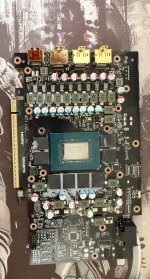
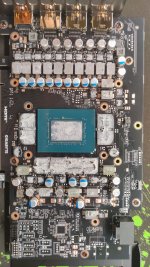
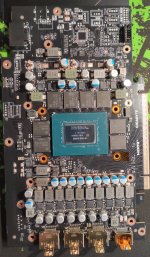
Hello, I'm trying to watercooling my Gigabyte RTX 5080 windforce but i noticed that my PCB is different and i had tried with other brand solution and didn't work and I'd like to know if the 10290 is compatible. Also I'd like to know if is possible to use thermal grizzly minus pad extreme 2 for VRM and VRAm and Thermal Grizzly Conductonaut Extreme for the DIE. ThanksIMG_3146.jpg
 

Eddy

Iceman
Staff member
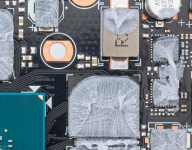
The PCB layout is new, and we do not support it. The capacitors in the image below are in the way. Gigabyte has once again changed the PCB to make it cheaper to produce. Normally, there would be voltage regulators here, not capacitors. Therefore, the cooler will not fit. What is the exact model name of the graphics card? Specifically, I am referring to the following number: GV-N5080WF3OC-16GD.
You should be able to find it somewhere, and it may be listed under a slightly different name.

Regarding alternative thermal pads, I can’t help you there. We do not test pads from other manufacturers. In the end, it is important that they have a hardness of maximum 30 Shore 00 or less. Harder pads will cause problems. For thermal paste, you can use whatever you want. However, liquid metal will always attack the cooler and the GPU die without exception. This is the case with every liquid metal thermal compound, and it is also completely unnecessary on a GPU. And if even a small amount spills somewhere it shouldn’t, the graphics card will be destroyed immediately.
 

gsanchez922

New member
The PCB layout is new, and we do not support it. The capacitors in the image below are in the way. Gigabyte has once again changed the PCB to make it cheaper to produce. Normally, there would be voltage regulators here, not capacitors. Therefore, the cooler will not fit. What is the exact model name of the graphics card? Specifically, I am referring to the following number: GV-N5080WF3OC-16GD.
You should be able to find it somewhere, and it may be listed under a slightly different name.

Regarding alternative thermal pads, I can’t help you there. We do not test pads from other manufacturers. In the end, it is important that they have a hardness of maximum 30 Shore 00 or less. Harder pads will cause problems. For thermal paste, you can use whatever you want. However, liquid metal will always attack the cooler and the GPU die without exception. This is the case with every liquid metal thermal compound, and it is also completely unnecessary on a GPU. And if even a small amount spills somewhere it shouldn’t, the graphics card will be destroyed immediately.
Thanks for the response. It there any chance this PCB will have a block in the future?
 

Eddy

Iceman
Staff member
I can’t tell you that at the moment. At least right now, nothing is in development. Whether that will change, I don’t know at this time. But if something does come, it would be no earlier than in 3–4 months.
 
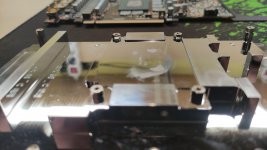
Hi, well yours looks like mine, Gigabyte RTX 5070Ti Windforce OC SFF. The 10290 block fits but i might need to shim the standoffs as there is too big of a gap - core sits quite high. I already sent inquiry to alphacool, will see.
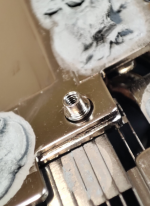
But block itself actually has milled space for the caps, see attached. Rest is not touching near VRMs.
There is certainly some DIY with these GPUs lately.

2026-02-07-22-04-51-845.jpg

2026-02-09-00-57-17-268 (002).jpg
 
Let me retract my compatibility statement, a bit.
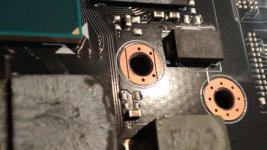
Seems that Gigabyte in their infinite wisdom decided to put two signal traces under one of the standoffs, so if you screw the block down it will short out those signals and GPU will not detect. At least in my case, I have first thought it was due to bend to PCB because in my case, GPU is 0,4mm taller then the flat plane for standoffs and i did damage the core\BGA balls, but when i dropped GPU back to original fan shroud, it works perfectly fine, ran stress test in 3dmark and furmark, no visible difference in performace\behavior.

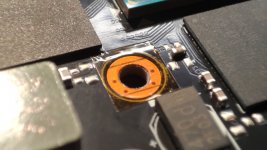
So, what is the culprit? This pad at the top right:
1770769207052.jpeg

I measured resistances, inner part is ground, the outer is part of some kind of power circuit (there is a choke and cap). Resistance between ground and the circuit is about 15Ohms.

I can see on the "older" PCB design, the outer edges of this hole are covered in mask (looks like):
1770769417286.png

Original fan shroud has quite tiny standoffs and are centered. The inner pad size is about 4mm and the standoffs have 3.94mm size, so it fits very precisely and does not short circuit:
1770769585436.png

I am lucky I guess the short circuit did 0 damage (I hope) and it was saved by some other electrical magic going around in there.

I will attempt to mask off the pad with kapton tape, all 4 of them to level out distances.
Also noticed they route PCIe signals around the bottom left one too, quite close to the mount. Seems it might get shorted too if the standoff scratches through the mask.

Well, should have listened and avoided gigabyte with all my might :D .
 
Top