
You are using an out of date browser. It may not display this or other websites correctly.
You should upgrade or use an alternative browser.
You should upgrade or use an alternative browser.
KFA2 4090 SG is not compatible with Eiswolf aio
- Thread starter Slokky
- Start date


On the fron there is nothing similar, on the back this is all what I have.Hi,
What is the PCB number of your graphics card? The number should look like this: 49NXM5.....
This is usually somewhere on the PCB. Usually on a sticker.
Attachments

High res photo from igors lab review pcb looks identical..
Like with thermal pads there is a bit of room to put it in diagonal?Looked the same on my two KFA2s, but the screw went in anyway. Just give it a try.
This is not an issue on your end. I've also got a galax 4090 SG. Exact same design as the KFA 4090 SG. It has the same issue. Yet from what i've seen alphacool doesn't seem to have any intentions of fixing the issue on their end. Many others that have had the same issue ended up using either a larger screw to widen that hole in the PCB, or use a drill bit (carefully) to do the same. It'll allow you to angle it and screw it in enough to keep it snug.
This will definitely void the warranty, but as is there doesn't seem to be any other fix if intending to use the AIO.
This will definitely void the warranty, but as is there doesn't seem to be any other fix if intending to use the AIO.


Are there also no PCB nUmmer on the front of the cooler?
Without a PCB number, it is not possible to determine whether Galax/KFA (same company) has brought out a new revision of the PCB. It is difficult to go by pictures. Often small changes to the PCB are enough to make the cooler incompatible. It is also possible that the PCB number is only on the packaging.
In general, compatibility cannot be guaranteed without a PCB number.
Without a PCB number, it is not possible to determine whether Galax/KFA (same company) has brought out a new revision of the PCB. It is difficult to go by pictures. Often small changes to the PCB are enough to make the cooler incompatible. It is also possible that the PCB number is only on the packaging.
In general, compatibility cannot be guaranteed without a PCB number.
I will try to see on the packaging. I bought this gpu on 4090 release. Also support told me to rma, so I probably willAre there also no PCB nUmmer on the front of the cooler?
Without a PCB number, it is not possible to determine whether Galax/KFA (same company) has brought out a new revision of the PCB. It is difficult to go by pictures. Often small changes to the PCB are enough to make the cooler incompatible. It is also possible that the PCB number is only on the packaging.
In general, compatibility cannot be guaranteed without a PCB number.
Are there also no PCB nUmmer on the front of the cooler?
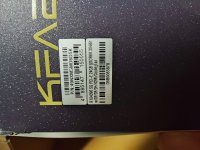
Here you are.
Great, thank you very much, that helps.
There are two variants of the PCB. One is yours, which is ‘actually’ supposed to be the right one, and this variant: 49NXM5MD6DSKb
We do not support this ‘b’ variant. However, these are still two identical cards. I suspect that KFA only sells the ‘b’ variant and has not changed this on the stickers. We have already had this with other brands.
That's super annoying for customers and of course for us too. Because the brands don't share this information and then you're faced with a problem like this.
That's why we write in every manual that you should physically check the compatibility beforehand. I can only advise you to send the cooler back. And we will remove the compatibility.
Sorry for the trouble.
There are two variants of the PCB. One is yours, which is ‘actually’ supposed to be the right one, and this variant: 49NXM5MD6DSKb
We do not support this ‘b’ variant. However, these are still two identical cards. I suspect that KFA only sells the ‘b’ variant and has not changed this on the stickers. We have already had this with other brands.
That's super annoying for customers and of course for us too. Because the brands don't share this information and then you're faced with a problem like this.
That's why we write in every manual that you should physically check the compatibility beforehand. I can only advise you to send the cooler back. And we will remove the compatibility.
Sorry for the trouble.